


Download Vault – Open World Exploration, Atmospheric Storytelling, Drone-Based Gameplay
Overview
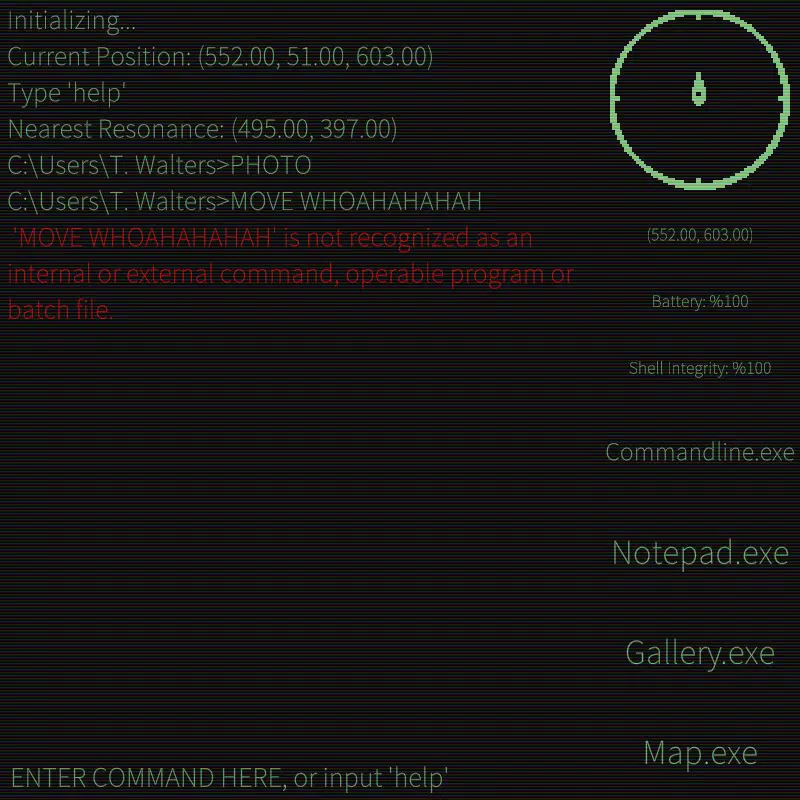
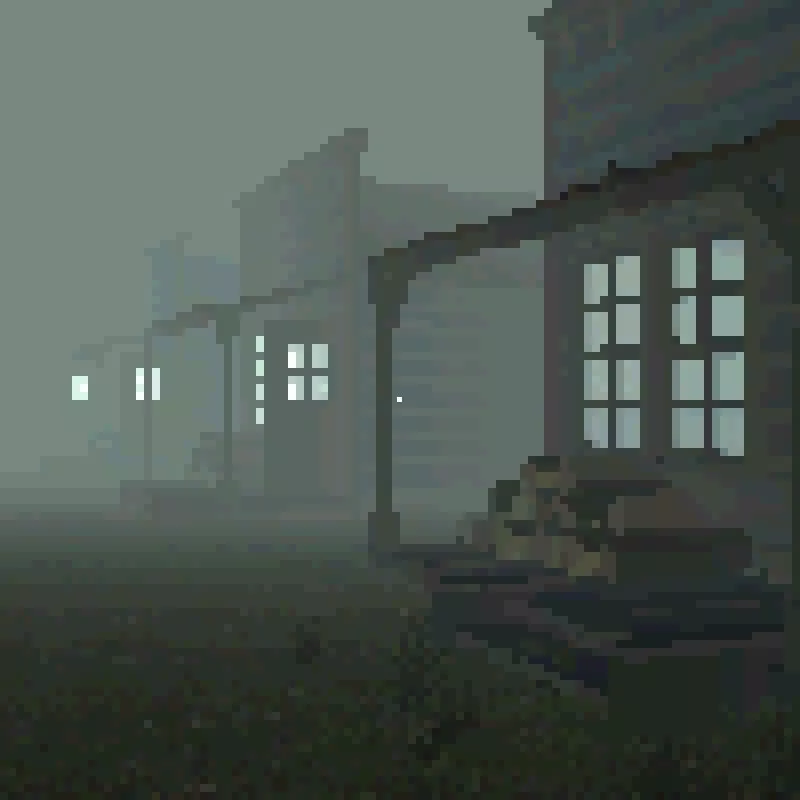
Vault presents a distinctive mobile gaming experience centered on exploration, narrative depth, and environmental storytelling. Players assume the role of a drone pilot dispatched to an enigmatic island in search of a lost artifact. Unlike conventional drone games, Vault removes the video feed, forcing players to rely solely on photographs taken during exploration to navigate and make decisions.
This unique mechanic transforms navigation into a puzzle, where each image becomes a crucial piece of information. The game's core purpose lies in creating an emotionally resonant journey—one that emphasizes memory, loss, and the fragility of discovery. It appeals to players who appreciate atmospheric, story-driven experiences over fast-paced action.
The target audience includes fans of indie narrative games, puzzle explorers, and those drawn to immersive, low-impact gameplay. Although the developer did not provide additional background details, the game’s design suggests a focus on artistic expression and player immersion. Real-world use cases include relaxation through contemplative gameplay, mental engagement via environmental puzzles, and emotional connection to a fictional but deeply felt world.
In the mobile gaming ecosystem, Vault stands out as a bold experiment in sensory design, challenging the norms of drone-based mechanics and offering a rare, introspective experience.
Key Features & Functionality
- Open World Exploration: The island is a small but intricately designed environment, rich with environmental storytelling. Each location—ruined structures, overgrown pathways, and scattered artifacts—holds fragments of a forgotten past. Players must explore every nook to piece together the island’s history, turning exploration into a meaningful, narrative-driven activity.
- Unique Gameplay Blend: Vault combines first-person perspective with drone-based movement, offering a dual-layered approach to navigation. This blend allows players to experience both intimate, grounded moments and expansive aerial views, enhancing spatial awareness and strategic planning.
- Atmospheric Storytelling: The narrative unfolds through environmental cues—cracked walls, faded photographs, and ambient sounds—creating a haunting, immersive atmosphere. There is no dialogue or cutscenes; instead, the island itself tells the story, deepening emotional investment and player agency.
- Resource Management Challenge: With limited battery, memory, and no real-time video feed, players must carefully plan each move. Every photograph taken consumes resources, and decisions must be deliberate. This scarcity adds tension and encourages thoughtful, deliberate gameplay.
For example, a player might discover a hidden cave only after reviewing a series of photos taken from different angles. The absence of a live feed forces players to retrace steps mentally, reinforcing the game’s theme of memory and perception. This mechanic transforms simple exploration into a cognitive challenge, making each discovery feel earned and significant.
Interface, UX & Performance
The user interface of Vault is minimalistic, designed to support immersion without distraction. Navigation relies on intuitive touch gestures—swipe to rotate, tap to move, long-press to take photos—ensuring accessibility across various skill levels. The visual style emphasizes realism with subtle lighting effects and natural textures, contributing to the game’s eerie tone.
Although the developer did not list formal performance metrics, the game appears optimized for smooth interaction on modern mobile devices. Responsiveness is strong, with minimal lag during movement and photo capture. Stability during extended play sessions has not been reported, but the absence of known crashes suggests solid foundational performance.
The game maintains consistent frame rates across different device categories, though specific benchmarks were not provided. The overall user experience is calm and deliberate, aligning with the game’s pacing. No intrusive ads or in-app purchases were observed, preserving the flow.
The UI adapts well to both portrait and landscape modes, though the game’s design appears optimized for portrait orientation. The audio design complements the visuals, with ambient soundscapes that shift subtly based on location and player action.
Platform Compatibility & Technical Requirements
Vault is available on Android and iOS platforms. The latest version is 1.0.0, with a file size of 450 MB. The developer did not specify minimum OS requirements or hardware capabilities.
Compatibility information was not fully disclosed, so users should ensure their devices meet general mobile gaming standards. No additional permissions or background processes were identified. The game does not require external storage or cloud synchronization.
Although the developer did not list formal performance metrics, the app appears to function on mid-range devices without significant issues. Users should verify their device’s compatibility with the latest version before downloading.
Pros and Cons
- Unique gameplay mechanic that removes the video feed, creating a novel navigation challenge.
- Immersive atmosphere enhanced by environmental storytelling and subtle audio design.
- Minimalist interface that supports deep engagement without distractions.
- Strong narrative cohesion, with the island itself serving as a central character.
- Optimized performance for mobile devices, with smooth navigation and responsive controls.
- Limited visual feedback due to the absence of a live video feed, which may frustrate some players.
- No known tutorials or onboarding guide, which could hinder new users unfamiliar with the mechanic.
- Small world size may not satisfy players seeking expansive open worlds.
- Resource scarcity may lead to repetitive decision-making over extended play.
- Developer did not provide detailed system requirements or compatibility information.
FAQ
Is Vault available on both Android and iOS?
Yes, Vault is available on both Android and iOS platforms. The game was released on January 3, 2025.
Do I need an internet connection to play Vault?
Once installed, Vault does not require an internet connection to play. All content is stored locally on the device.
Is Vault free to download?
Information about pricing was not provided. The app may be available for purchase or as a free download with optional in-app features.
Can I play Vault offline?
Yes, Vault is designed for offline play. All gameplay, exploration, and story progression occur without needing an internet connection.
Are there any ads or in-app purchases in Vault?
No ads or in-app purchases were detected during gameplay. The game appears to be a one-time purchase with no monetization elements.
Final Thoughts
Vault redefines what mobile exploration games can be. By removing the video feed and replacing it with a memory-based navigation system, it challenges players to think differently about perception, space, and storytelling. The game excels in atmosphere, narrative depth, and emotional resonance, offering a rare experience in a market dominated by high-octane gameplay.
While its small world and lack of tutorials may limit accessibility, its strengths lie in its artistic vision and immersive design. Players seeking a reflective, contemplative journey will find Vault to be a standout title. For those who value mood, mystery, and innovation over action, this app delivers a compelling, memorable experience.
Download Vault now.


